Use audio effects
You can modify the output of Audio Mixer components by applying Audio Effects. These can filter the frequency ranges of the sound or apply reverb and other effects.
Add audio effects to your mixer
To add an audio effect to your Audio Mixer, in the component, select Add Effect. Unity shows you a list of the following effects you can add to your mixer:
- LowPass
- HighPass
- Echo
- Flange
- Distortion
- Normalize
- Param EQ
- Pitch Shifter
- Chorus
- Compressor
- SFX Reverb
- LowPass Simple
- HighPass Simple
Profile your audio effects
Though highly optimized, some filters are still CPU intensive. You can monitor audio CPU usage in the profilerA window that helps you to optimize your game. It shows how much time is spent in the various areas of your game. For example, it can report the percentage of time spent rendering, animating, or in your game logic. More info
See in Glossary under the Audio tab.
Reorder audio effects
The ordering of the components is important, since it reflects the order in which the effects will be applied to the source audio. For example, in the image below, the Music section of an Audio Mixer is modified first by a Lowpass effect and then a compressor Effect, Flange Effect and so on.
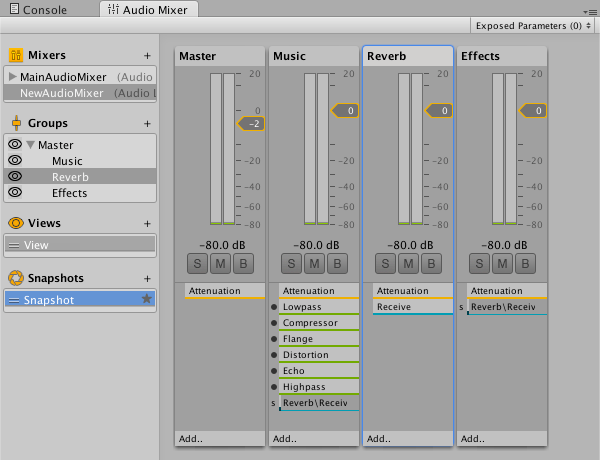
To change the order of these and any other components, open a context menu in the inspectorA Unity window that displays information about the currently selected GameObject, asset or project settings, allowing you to inspect and edit the values. More info
See in Glossary and select the Move Up or Move Down commands.
AudioEffectMixer
Copyright © 2023 Unity Technologies
优美缔软件(上海)有限公司 版权所有
"Unity"、Unity 徽标及其他 Unity 商标是 Unity Technologies 或其附属机构在美国及其他地区的商标或注册商标。其他名称或品牌是其各自所有者的商标。
公安部备案号:
31010902002961