docs.unity.cn
Search Results for

    Show / Hide Table of Contents

    Is Match Formatter

    Use the Is Match Formatter to evaluate regular expressions to control the output. The Is Match Formatter is not included by default. You can add it to the Formatters in the Smart Format Settings.

    Note: In the options part of the formatter, not all RegEx characters are valid, for example curly braces and parentheses aren’t supported. This is because the same parser is used as for all other extensions.
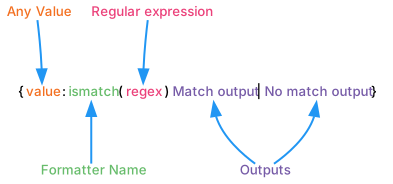
    Diagram showing the breakdown of the Smart String and how each part is evaluated when using IsMatch.

    Example Smart String Arguments Result
    {theKey:ismatch(^.+123.+$):Okay - {}|No match content} [!code-cs] Okay - Some123Content
    {theKey:ismatch(^.+123.+$):Fixed content if match|No match content} [!code-cs] Fixed content if match
    {0:list:{:ismatch(^100|200|999$):{:0.00}|'no match'}|, | and } [!code-cs] 100.00, 200.00 and 'no match'
    {0:list:{:ismatch(^100|200|999$):'match'|'no match'}|, | and } [!code-cs] 'match', 'match' and 'no match'
    In This Article
    Back to top
    Copyright © 2024 Unity Technologies — Trademarks and terms of use
    • Legal
    • Privacy Policy
    • Cookie Policy
    • Do Not Sell or Share My Personal Information
    • Your Privacy Choices (Cookie Settings)