{!See https://docs.google.com/document/d/1takg_GmIBBKKTj-GHZCwzxohpQz7Bhekivkk72kYMtE/edit for reference implementation of OneTrust, dataLayer and GTM} {!OneTrust Cookies Consent} {!OneTrust Cookies Consent end} {!dataLayer initialization push} {!dataLayer initialization push end} {!Google Tag Manager} {!Google Tag Manager end} Flip Face Normals | ProBuilder | 5.2.0
docs.unity.cn
Search Results for

    Show / Hide Table of Contents

    Flip Normals icon Flip Face Normals

    The Flip Face Normals action flips the normals only on the selected face(s).
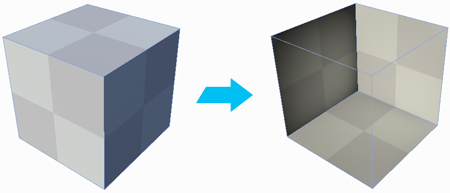
    Inside of cube is visible after Normals change

    This differs from the Flip Normals action, which flips the normals on every single face on the Mesh.

    Tip: You can also use this action with the Alt/Opt+N shortcut, or from the ProBuilder menu (Tools > ProBuilder > Geometry > Flip Face Normals).

    In This Article
    Back to top
    Copyright © 2023 Unity Technologies — Trademarks and terms of use
    • Legal
    • Privacy Policy
    • Cookie Policy
    • Do Not Sell or Share My Personal Information
    • Your Privacy Choices (Cookie Settings)