Broadcast Sample
The Broadcast sample can stream video and audio to multi Unity applications.
This sample can use in combination with other samples below.
This sample uses build-in render pipeline. If you want to try High-Definition Render pipeline or Universal Render Pipeline, please try Render Pipeline Sample.
Usage
Hardware acceleration
Recommend enabling Hardware Encoder support on the Render Streaming inspector to improve performance using hardware acceleration.
Procedure
1) Launch the signaling server using public mode. Please refer to this link for launching.

2) Build a scene as a receiver (ex. Receiver scene) in Unity Editor, and launch an application.
3) Open Broadcast scene.

4) Specify IP address of the signaling server to the Signaling URL parameter on the inspector.
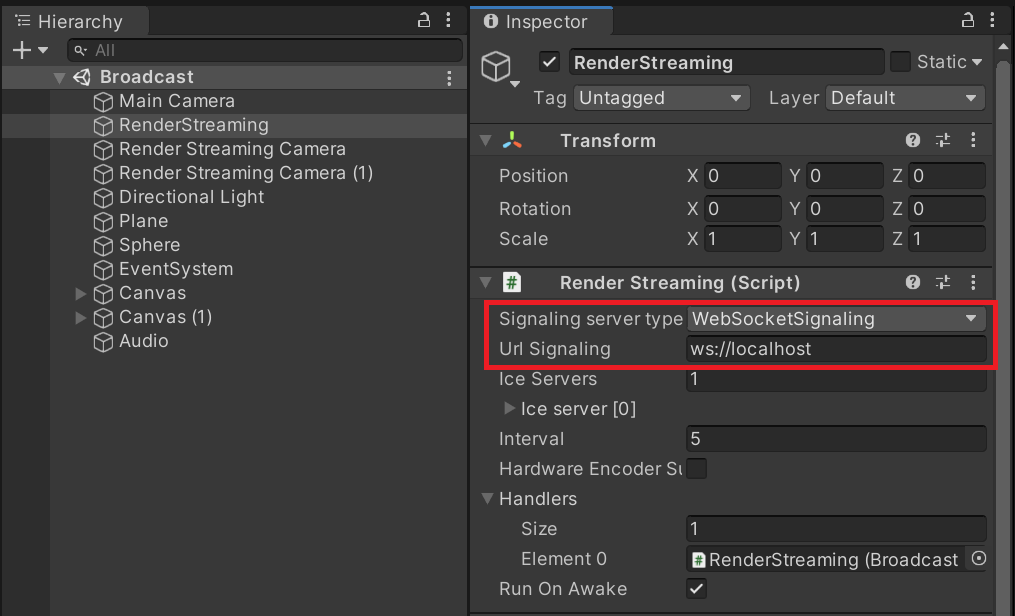
5) Click on the Play button in Unity Editor.
6) Operate the receiver and check the streaming video/audio correctly.