Default VFX Graph Templates window
Use the template window to create a VFX Graph asset with a predefined effect. You can use these templates as a starting point for your own effects. Each template has a description and an image to describe its behavior.
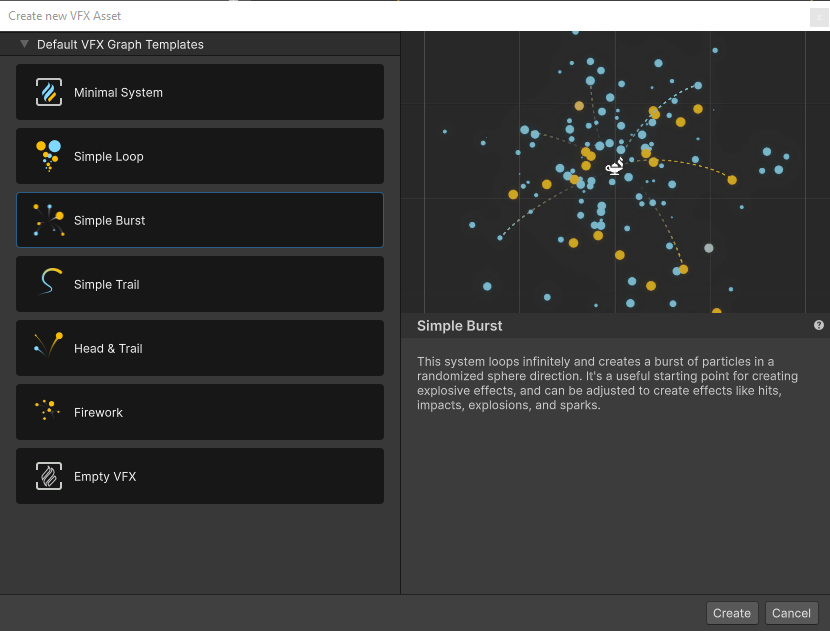
Create a VFX Graph Template
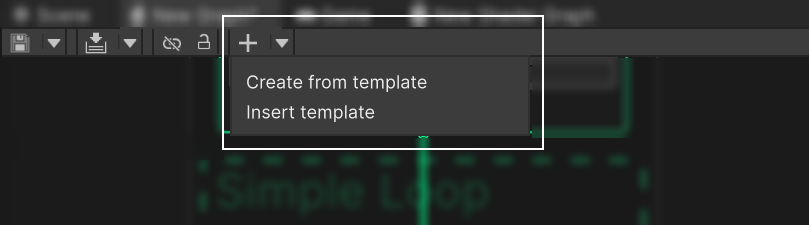
To open the Default VFX Graph Templates window:
- Select the dropdown arrow next to the Add (+) icon in the Visual Effect graph toolbar.
- Select one of the following options:
- Create from template - Creates a new VFX Graph asset based on a VFX Graph template.
- Insert template - adds a VFX Graph template to the VFX Graph asset that is currently open.
- In the Create new VFX Asset window, select a Default VFX Graph template.
- Double-click the Template asset, or select Create
Note: Select the Add (+) button to repeat the last action you selected in the dropdown. For example, if you select Insert Template, the Add (+) button opens the Insert Template window.
Create a custom VFX Graph template
VFX Graph includes an API that you can use to create and manage your own VFX Graph templates.
To create a new VFX Graph template, use the VFXTemplateHelper.TrySetTemplate method.
Include the following in your script:
- The path to the VFX asset.
- A
VFXTemplateDescriptorstructure with following information:- Name: Name of the template.
- Category: The category this template appears in.
- Description: A description for the template to display in the template window details panel.
- Icon: (optional) An image icon to show in the template window list of templates.
- Thumbnail: (optional) An image to display in the template window details panel.
The method returns true when the script creates a new template, otherwise it returns false.
Custom templates appear in the templates window in the Category you defined.
Use an existing VFX Graph template in script
To get an existing template descriptor:
- Use the method
VFXTemplateHelper.TryGetTemplate.
2.Provide the path to the asset and aVFXTemplateDescriptorstructure that will be filled if the asset is found and is a template.
The method returns true when the script finds the template, otherwise it returns false.