Game Services(HMS)
Introduction
Unity Developer Guide for one of Huawei AppGallery Kit - Game Services
How to Integrating the Game Service into Your Unity Project
1. Import this Huawei HMS Core App Services from Unity Asset Store
2. Add these following configuration files into Assets/Plugins/Android
2.1 agconnect-services.json
refer to Adding the AppGallery Connect Configuration File of Your App in Huawei AppGallery to find the file and download it.
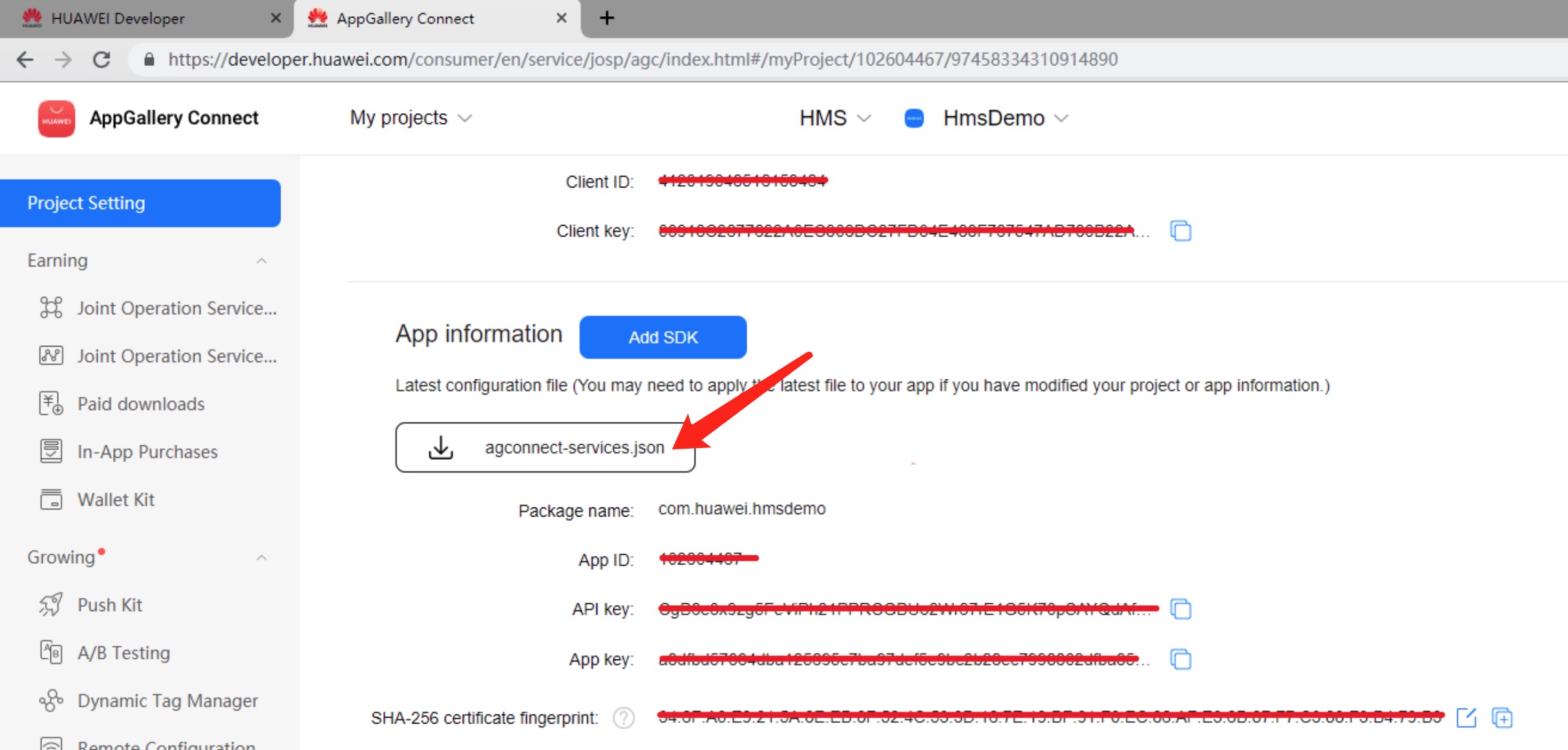
2.2 baseProjectTemplate.gradle
add the AppGallery Connect plugin and the Maven repository
 ```
 allprojects {
     buildscript {
         repositories {**ARTIFACTORYREPOSITORY**
             google()
             jcenter()
             maven { url 'https://developer.huawei.com/repo/' }
         }

         dependencies {
             // If you are changing the Android Gradle Plugin version, make sure it is compatible with the Gradle version preinstalled with Unity
             // See which Gradle version is preinstalled with Unity here https://docs.unity3d.com/Manual/android-gradle-overview.html
             // See official Gradle and Android Gradle Plugin compatibility table here https://developer.android.com/studio/releases/gradle-plugin#updating-gradle
             // To specify a custom Gradle version in Unity, go do "Preferences > External Tools", uncheck "Gradle Installed with Unity (recommended)" and specify a path to a custom Gradle version
             classpath 'com.android.tools.build:gradle:3.4.0'
             classpath 'com.huawei.agconnect:agcp:1.2.1.301'
             **BUILD_SCRIPT_DEPS**
         }
     }

     repositories {**ARTIFACTORYREPOSITORY**
         google()
         jcenter()
         flatDir {
             dirs "${project(':unityLibrary').projectDir}/libs"
         }
         maven { url 'https://developer.huawei.com/repo/' }
     }
 }
 ```
2.3 launcherTemplate.gradle
adding build dependencies
 ```
 dependencies {
     ...
     implementation 'com.huawei.agconnect:agconnect-core:1.2.0.300'
     implementation 'com.huawei.hms:base:4.0.1.300'
     implementation 'com.huawei.hms:hwid:4.0.1.300'
     implementation 'com.huawei.hms:game:4.0.1.300'
     ...
     }
 ```
2.4 mainTemplate.gradle
adding build dependencies
 ```
 dependencies {
     ...
     implementation 'com.huawei.agconnect:agconnect-core:1.2.0.300'
     implementation 'com.huawei.hms:base:4.0.1.300'
     implementation 'com.huawei.hms:hwid:4.0.1.300'
     implementation 'com.huawei.hms:game:4.0.1.300'
     ...
 **DEPS**}
 ```
3. Huawei API reference link & integration guide
3.1 Huawei API reference https://developer.huawei.com/consumer/en/doc/development/HMSCore-References-V5/jos-games-0000001050121646-V5
3.2 Huawei API integration guide https://developer.huawei.com/consumer/en/doc/HMSCore-Guides-V5/dev-process-0000001050193900-V5
4. These following APIs connection should be well configurated first in Huawei before you use them
4.1 Achievement成就 https://developer.huawei.com/consumer/en/doc/distribution/app/agc-add_achievement
4.2 Event事件 https://developer.huawei.com/consumer/en/doc/distribution/app/agc-add_event
4.3 Leaderboard排行榜 https://developer.huawei.com/consumer/en/doc/distribution/app/agc-add_leaderboard
5. Demo
There are corresponding example scene in example project for GameServices Kit. For test, you need to build it onto Android mobile build by HMS. Make sure you have created HMS account and project. Then, you can change the configuration and test different functions.
Tips: how to use demo
Before using the sample code, read the integration part of the document carefully. Run the sample code only after you complete the following operations:
- Please use your own agconnect-services.json file, you can refer to section 2.1 in the document
- Configure your Keystore in Keystore Manager File >
Build Settings > Player Settings > Publishing Settings > Project Keystore. - You can use your own Company Name, Product Name, Version number, and the rest of settings in Player setting.
- Please avoid including the Chinese character in your project path to prevent unnecessary errors。
- Please refer to the link to configure the Signing Certificate Fingerprint.
- If you need to test achievements, events, and leaderboard functions, you need to refer to the fourth part of the document for configuration.
6. Change Log For Reference
2020-09-29
- New: Add
CheckUpdate,ShowUpdateDialog,ReleaseCallBackto check if there is a later version. - New: Add
CancelAuthorizationto revoke authorization on your app. - New: Add
StartReadSms,RegisterSMSBroadcastReceiver,UnregisterSMSBroadcastReceiverto automatically read an SMS verification code. - New: Add
GetCachePlayerId,SubmitPlayerEvent,GetPlayerExtraInfo,SavePlayerInfo. - New: Add
GetThumbnailto obtain the data of an archive cover. - Fix: interfaces that are not working properly.
7. API References List
Initializing the Game Service SDK
HuaweiGameService.AppInit()
Initializes an app. This method must be called when the application is started.
HuaweiGameService.Init()
The app calls the Init method to initialize the game.
HuaweiGameService.CheckUpdate(ICheckUpdateListener listener)
Checks for a new version of an app after the app is launched and initialized or a user proactively checks for update for the app.
Parameters
- ICheckUpdateListener - The callback that will run.
HuaweiGameService.ShowUpdateDialog(AndroidJavaObject jo, bool mustBtnOne)
Checks for a new version of an app after the app is launched and initialized or a user proactively checks for update for the app.
Parameters
- AndroidJavaObject - Detected update information.For details, please refer to ApkUpgradeInfo.
- mustBtnOne - Indicates whether forcible update is required for a user. The options are as follows:
- true: The app update pop-up displays only the update button and the user must update the app.
- false: The app update pop-up displays both the update and cancel buttons. The user can tap the cancel button to cancel the update.
HuaweiGameService.ReleaseCallBack()
Releases callback to prevent memory leaks. You need to call this method in destroy. For methods of static internal classes, this method does not need to be called.
Account
HuaweiGameService.Login(ILoginListener listener)
Start the store login process.Return and cache user information.
Parameters
- ILoginListener - The callback that will run.
HuaweiGameService.SilentSignIn(ILoginListener listener)
The LoginCallback contains SignInAccountProxy or error information for the user who is signed in to this app. If no user is signed in, try to sign the user in without displaying any user interface.
- Parameters
- ILoginListener - The callback that will run.
HuaweiGameService.SignOut(ILoginListener listener)
Signs out the current signed-in user if any. It also deletes the cached signInAccount information.
Parameters
- ILoginListener - The callback that will run.
ILoginListener
public interface ILoginListener
{
    //signInAccountProxy - Class that holds the basic account information of the signed-in user.
    void OnSuccess(SignInAccountProxy signInAccountProxy);

    void OnSignOut();

    void OnFailure(int code, string message);
}
HuaweiGameService.CancelAuthorization(ICancelAuthListener listener)
To improve privacy security, users are allowed to revoke authorization on your app.
Parameters
- ICancelAuthListener - The callback that will run.
HuaweiGameService.StartReadSms(IStartReadSmsListener listener)
If your app requires a user to enter a mobile number and verify the user identity using an SMS verification code, you can integrate the ReadSmsManager service so that your app can automatically read the SMS verification code without applying for the SMS read permission.
Parameters
- IStartReadSmsListener - The callback that will run.
HuaweiGameService.RegisterSMSBroadcastReceiver(ISMSReceive receive)
When the user's device receives the verification message, HMS Core (APK) will explicitly broadcast it to your app, where the intent contains the message text. Your app can receive the verification message through a broadcast.
Parameters
- ISMSReceive - The callback that will run.
HuaweiGameService.UnregisterSMSBroadcastReceiver()
Unregister to get SMS broadcast.
Achievement interface
Displaying Achievements
HuaweiGameService.GetAchievementList(bool forceReload, IGetAchievementListListener listener)
Obtains the list of achievements of currently signed-in player.
Parameters
forceReload - Indicates to obtain the achievement list from the server or client. The options are as follows:
true: serverfalse: clientIGetAchievementListListener - The callback that will run.
IGetAchievementListListener
public interface IGetAchievementListListener
{
    //achievementList - The list of achievements of the current player.
    void OnSuccess(List<Achievement> achievementList);

    void OnFailure(int code, string message);
}
HuaweiGameService.GetAchievementsIntent(IGetAchievementsIntentListener listener)
Returns an Intent in the callback to display the game's achievements.
- Parameters
- IGetAchievementsIntentListener - The callback that will run.
IGetAchievementsIntentListener
public interface IGetAchievementsIntentListener
{
    //AndroidJavaClass: android.content.Intent, an Intent to show the list of achievements for a game.
    void OnSuccess(AndroidJavaObject intent);

    void OnFailure(int code, string message);
}
Revealing an Achievement
HuaweiGameService.Reveal(string achievementId)
Reveals a hidden achievement to the currently signed-in player. If the achievement has already been unlocked, this will have no effect.
Use this method if you do not need to know the interface results immediately.
Please note that updates may not be sent to the server immediately.
If you need to get the execution result of the API, see AsyncReveal(string achievementId, IRevealListener listener).
Parameters
- achievementId - ID of the achievement to be revealed.
HuaweiGameService.AsyncReveal(string achievementId, IRevealListener listener)
Get callback asynchronously to show hidden achievements to the currently signed-in player. If the achievement is already visible, this will have no effect.
This form of the API will attempt to update the user's achievement on the server immediately, and return the execution result.
Parameters
achievementId - ID of the achievement to be revealed.
IRevealListener - The callback that will run.
IRevealListener
public interface IRevealListener
{
    void OnSuccess();

    void OnFailure(int code, string message);
}
Increasing Steps
HuaweiGameService.Increment(string achievementId, int numSteps)
Increments an achievement by the given number of steps. The achievement must be an incremental achievement. Once an achievement reaches at least the maximum number of steps, it will be unlocked automatically. Any further increments will be ignored.
Use this method if you do not need to know the interface results immediately.
Please note that updates may not be sent to the server immediately.
If you need to get the execution result of the API, see AsyncIncrement(string achievementId, int numSteps, IIncrementListener listener).
Parameters
achievementId - ID of the achievement requiring step increase.
numSteps - Number of steps to be increased. The value must be greater than 0.
HuaweiGameService.AsyncIncrement(string achievementId, int numSteps, IIncrementListener listener)
Get callback asynchronously to increment an achievement by the given number of steps. The achievement must be an incremental achievement. Once an achievement reaches at least the maximum number of steps, it will be unlocked automatically. Any further increments will be ignored.
This form of the API will attempt to update the user's achievement on the server immediately, and return the execution result.
Parameters
achievementId - ID of the achievement requiring step increase.
numSteps - Number of steps to be increased. The value must be greater than 0.
IIncrementListener - The callback that will run.
IIncrementListener
public interface IIncrementListener
{
    void OnSuccess(bool isSuccess);

    void OnFailure(int code, string message);
}
Setting Steps
HuaweiGameService.SetSteps(string achievementId, int numSteps)
Set the number of steps to complete the achievement. Once the achievement reaches the maximum number of steps, the achievement will automatically be unlocked, and any further mutation operations will be ignored.
Use this method if you do not need to know the interface results immediately.
Please note that updates may not be sent to the server immediately.
If you need to get the execution result of the API, see HuaweiGameService.AsyncSetSteps(string achievementId, int numSteps, ISetStepsListener listener).
Parameters
achievementId - ID of the achievement requiring step setup.
numSteps - Number of steps to be set. The value must be greater than 0.
HuaweiGameService.AsyncSetSteps(string achievementId, int numSteps, ISetStepsListener listener)
Get callback asynchronously to set the number of steps to complete the achievement. Once the achievement reaches the maximum number of steps, the achievement will automatically be unlocked, and any further mutation operations will be ignored.
This form of the API will attempt to update the user's achievement on the server immediately, and return the execution result.
Parameters
achievementId - ID of the achievement requiring step setup.
numSteps - Number of steps to be set. The value must be greater than 0.
ISetStepsListener - The callback that will run.
ISetStepsListener
public interface ISetStepsListener
{
    //isSuccess - The value true indicates that the execution is successful.
                  The value false indicates that the API is called successfully but fails to be executed.
                  If the execution fails, you need to check whether the achievement ID and set number of steps are correct.
    void OnSuccess(bool isSuccess);

    void OnFailure(int code, string message);
}
Unlocking an Achievement
HuaweiGameService.Unlock(string achievementId)
Unlocks an achievement for the currently signed in player. If the achievement is hidden this will reveal it to the player.
Use this method if you do not need to know the interface results immediately.
Please note that updates may not be sent to the server immediately.
If you need to get the execution result of the API, see AsyncUnlock(string achievementId, IUnlockListener listener).
Parameters
- achievementId - ID of the achievement to be unlocked.
HuaweiGameService.AsyncUnlock(string achievementId, IUnlockListener listener)
Get callback asynchronously to unlock an achievement for the currently signed in player. If the achievement is hidden this will reveal it to the player.
This form of the API will attempt to update the user's achievement on the server immediately, and return the execution result.
- Parameters
- achievementId - ID of the achievement to be unlocked.
- IUnlockListener - The callback that will run.
IUnlockListener
public interface IUnlockListener
{
    void OnSuccess();

    void OnFailure(int code, string message);
}
leaderboards
Submitting a Player’s Score
HuaweiGameService.GetLeaderboardSwitchStatus(ILeaderboardSwitchStatusListener listener)
Obtains the leaderboard switch setting. Indicates whether a player agrees to report their scores to leaderboards. The switch is disabled by default upon first sign-in of the player.
Parameters
- ILeaderboardSwitchStatusListener - The callback that will run.
HuaweiGameService.SetLeaderboardSwitchStatus(int status, ILeaderboardSwitchStatusListener listener)
Sets the leaderboard switch.
Parameters
status - Status of the leaderboard switch to be set.
0: off 1: onILeaderboardSwitchStatusListener - The callback that will run.
ILeaderboardSwitchStatusListener
public interface ILeaderboardSwitchStatusListener
{
    //statusValue - Indicates whether to return the leaderboard switch setting in asynchronous mode.
                    0: no
                    1: yes
    void OnSuccess(int statusValue);

    void OnFailure(int code, string message);
}
HuaweiGameService.SubmitScore(string leaderboardId, int score)
Submit a score to a leaderboard for the currently signed-in player.
Use this method if you do not need to know the interface results immediately.
Please note that updates may not be sent to the server immediately.
If you need to get the execution result of the API, see AsyncSubmitScore(string leaderboardId, int score, ISubmitScoreListener listener).
Parameters
leaderboardId - Leaderboard ID.
score - Score of the current player.
HuaweiGameService.AsyncSubmitScore(string leaderboardId, int score, ISubmitScoreListener listener)
Submit a score to a leaderboard for the currently signed-in player, this method gets the callback asynchronously.
This method gets the callback asynchronously. This form of the API will attempt to submit the score to the server immediately,and return the execution result.
Parameters
leaderboardId - Leaderboard ID.
score - Score of the current player.
ISubmitScoreListener - The callback that will run.
ISubmitScoreListener
public interface ISubmitScoreListener
{
    //scoreSubmission - Submission result.
    void OnSuccess(ScoreSubmission scoreSubmission);

    void OnFailure(int code, string message);
}
HuaweiGameService.SubmitScore(string leaderboardId, int score, string scoreTag)
Submit a score to a leaderboard for the currently signed-in player.
Use this method if you do not need to know the interface results immediately.
Please note that updates may not be sent to the server immediately.
If you need to get the execution result of the API, see AsyncSubmitScore(string leaderboardId, int score, string scoreTag, ISubmitScoreListener listener).
Parameters
leaderboardId - Leaderboard ID.
score - Score of the current player.
scoreTag - Score tag. Only letters, digits, underscores (_), and hyphens (-) are supported.
HuaweiGameService.AsyncSubmitScore(string leaderboardId, int score, string scoreTag, ISubmitScoreListener listener)
Submit a score to a leaderboard for the currently signed-in player, this method gets the callback asynchronously.
This form of the API will attempt to submit the score to the server immediately,and return the execution result.
Parameters
leaderboardId - Leaderboard ID.
score - Score of the current player.
scoreTag - Score tag. Only letters, digits, underscores (_), and hyphens (-) are supported.
ISubmitScoreListener - The callback that will run.
Displaying the Leaderboard List Screen
HuaweiGameService.GetAllLeaderboardsIntent(IGetLeaderboardIntentListener listener)
Obtains the Intent object of the leaderboard list screen.
- Parameters
- IGetLeaderboardIntentListener - The callback that will run.
HuaweiGameService.GetLeaderboardIntent(string leaderboardId, IGetLeaderboardIntentListener listener)
Obtains the Intent object of the screen for a specified leaderboard in all time span.
Parameters
leaderboardId - ID of a leaderboard for which data is to be obtained.
IGetLeaderboardIntentListener - The callback that will run.
HuaweiGameService.GetLeaderboardIntent(string leaderboardId, int timeSpan, IGetLeaderboardIntentListener listener)
Obtains the Intent object of the screen for a specified leaderboard in a specified time span.
Parameters
leaderboardId - ID of a leaderboard for which data is to be obtained.
timeSpan - Time span to retrieve data for.
0: The daily leaderboard is obtained.
1: The weekly leaderboard is obtained.
2: The all-time leaderboard is obtained.IGetLeaderboardIntentListener - The callback that will run.
IGetLeaderboardIntentListener
public interface IGetLeaderboardIntentListener
{
    //AndroidJavaClass: android.content.Intent - An Intent to show a leaderboard or the list of leaderboards for the game.
    void OnSuccess(AndroidJavaObject intent);

    void OnFailure(int code, string message);
}
HuaweiGameService.GetLeaderboardsData(bool isRealTime, IGetLeaderboardsListener listener)
Obtains all leaderboard data. You can specify whether to obtain the data from server or the local cache.
Parameters
isRealTime - Indicates whether to obtain leaderboard data from server.
true: Obtain data from server.false: Obtain data from the local cache.IGetLeaderboardsListener - The callback that will run.
IGetLeaderboardListener
public interface IGetLeaderboardsListener
{
    //leaderboards - A list of leaderboards metadata for this game.
    void OnSuccess(List<LeaderboardProxy> leaderboards);

    void OnFailure(int code, string message);
}
HuaweiGameService.GetLeaderboardData(string leaderboardId, bool isRealTime, IGetLeaderboardListener listener)
Obtains the data of a specified leaderboard. You can specify whether to obtain the data from server or the local cache.
Parameters
leaderboardId - ID of a leaderboard for which data is to be obtained.
isRealTime - Indicates whether to obtain leaderboard data from server.
true: Obtain data from server.false: Obtain data from the local cache.IGetLeaderboardListener - The callback that will run.
IGetLeaderboardListener
public interface IGetLeaderboardListener
{
    //leaderboardProxy - Data of a leaderboard specified by leaderboardId.
    void OnSuccess(LeaderboardProxy leaderboardProxy);

    void OnFailure(int code, string message);
}
Displaying Scores
HuaweiGameService.GetLeaderboardTopScores(string leaderboardId, int timeSpan, int maxResults, bool isRealTime, IGetLeaderboardScoresListener listener)
Gets leaderboard top scores.
Parameters
leaderboardId - ID of a leaderboard for which data is to be obtained.
timeSpan - Time span to retrieve data for.
0: daily 1: weekly 2: all-timemaxResults - Maximum number of records on each page. The value is an integer ranging from 1 to 200.
isRealTime - Indicates whether to obtain leaderboard data from server.
true: Obtain data from server.false: Obtain data from the local cache.IGetLeaderboardScoresListener - The callback that will run.
IGetLeaderboardScoresListener
public interface IGetLeaderboardScoresListener
{
    //leaderboardScores - List of scores on a specified leaderboard.
    void OnSuccess(LeaderboardScores leaderboardScores);

    void OnFailure(int code, string message);
}
HuaweiGameService.GetLeaderboardTopScores(string leaderboardId, int timeSpan, int maxResults, long offset, int pageDirection, IGetLeaderboardScoresListener listener)
Gets leaderboard top scores.
Parameters
leaderboardId - ID of a leaderboard for which data is to be obtained.
timeSpan - Time span to retrieve data for.
0: daily 1: weekly 2: all-timemaxResults - Maximum number of records on each page. The value is an integer ranging from 1 to 21.
offset - Get a page of data from the position specified by offset. The value of offset must be an integer greater than or equal to 0.
pageDirection - Data obtaining direction. Currently, only the value 0 is supported, indicating that data of the next page is obtained.
IGetLeaderboardScoresListener - The callback that will run.
HuaweiGameService.GetCurrentPlayerLeaderboardScore(string leaderboardId, int timeSpan, IGetLeaderboardScoreListener listener)
Obtains the score of a player on a specified leaderboard in a specified time frame.
Parameters
leaderboardId - ID of a leaderboard for which data is to be obtained.
timeSpan - Time span to retrieve data for.
0: daily 1: weekly 2: all-timeIGetLeaderboardScoreListener - The callback that will run.
IGetLeaderboardScoreListener
public interface IGetLeaderboardScoreListener
{
    //leaderboardScore - The signed-in player's score for the leaderboard specified by leaderboardId.
    void OnSuccess(LeaderboardScore leaderboardScore);

    void OnFailure(int code, string message);
}
HuaweiGameService.GetPlayerCenteredLeaderboardScores(string leaderboardId, int timeSpan, int maxResults, bool isRealTime, IGetLeaderboardScoresListener listener)
Obtains scores of a leaderboard with the current player's score displayed in the center. The data can be obtained from the local cache. For example, if a player ranks fifth on a leaderboard, this method can be used to obtain the scores of a specified number of players before and after the current player.
Parameters
leaderboardId - ID of a leaderboard for which data is to be obtained.
timeSpan - Time span to retrieve data for.
0: daily 1: weekly 2: all-timemaxResults - Maximum number of records on each page. The value is an integer ranging from 1 to 21.
isRealTime - Indicates whether to obtain leaderboard data from server.
true: Obtain data from server.false: Obtain data from the local cache.IGetLeaderboardScoresListener - The callback that will run.
HuaweiGameService.GetPlayerCenteredLeaderboardScores(string leaderboardId, int timeSpan, int maxResults, long offset, int pageDirection, IGetLeaderboardScoresListener listener)
Obtains scores of a leaderboard with the current player's score displayed in the center. The data can be obtained only from server.
Parameters
leaderboardId - ID of a leaderboard for which data is to be obtained.
timeSpan - Time span to retrieve data for.
0: daily 1: weekly 2: all-timemaxResults - Maximum number of records on each page. The value is an integer ranging from 1 to 21.
offset - Get a page of data from the position specified by offset. The value of offset must be an integer greater than or equal to 0.
pageDirection - Data obtaining direction. 0: next page. 1: previous page
IGetLeaderboardScoresListener - The callback that will run.
HuaweiGameService.GetMoreLeaderboardScores(string leaderboardId, long offset, int maxResults, int pageDirection, int timeSpan, IGetLeaderboardScoresListener listener)
Obtains scores on a leaderboard in pagination mode.
Parameters
leaderboardId - ID of a leaderboard for which data is to be obtained.
offset - Get a page of data from the position specified by offset. The value of offset must be an integer greater than or equal to 0.
maxResults - Maximum number of records on each page. The value is an integer ranging from 1 to 21.
pageDirection - Data obtaining direction. 0: next page. 1: previous page
timeSpan - Time span to retrieve data for.
0: daily 1: weekly 2: all-timeIGetLeaderboardScoresListener - The callback that will run.
events
Submitting Events
HuaweiGameService.EventIncrement(string eventId, int incrementAmount)
Increments an event specified by eventId by the given number of steps. Event increments are cached locally and flushed to the server in batches.
Parameters
eventId - ID of the event to be submitted.
incrementAmount - Increment amount of the existing event value.
Obtaining Events
HuaweiGameService.GetEventList(bool forceReload, IGetEventListListener listener)
Obtains all event data of the current player.
Parameters
forceReload - Indicates whether to load the event list stored on the server or cached locally.
true: serverfalse: local cacheIGetEventListListener - The callback that will run.
HuaweiGameService.GetEventListByIds(bool forceReload, string[] eventIds, IGetEventListListener listener)
Gets event list by specified event IDs.
Parameters
forceReload - Indicates whether to load the event list stored on the server or cached locally.
true: serverfalse: local cacheeventIds - IDs of the events to be obtained. The value is a string array.
IGetEventListListener - The callback that will run.
IGetEventListListener
public interface IGetEventListListener
{
    //eventList - The list of event data.
    void OnSuccess(List<EventProxy> eventList);

    void OnFailure(int code, string message);
}
extras
Obtaining current Player
HuaweiGameService.GetCurrentPlayer(bool isRealTime, IGetPlayerListener listener)
Obtains the Player object of the currently signed-in player.
Parameters
- IGetPlayerListener - The callback that will run.
IGetPlayerListener
public interface IGetPlayerListener
{
    //player - The specific information about a player.
    void OnSuccess(Player player);

    void OnFailure(int code, string message);
}
HuaweiGameService.GetCachePlayerId(IGetCachePlayerIdListener listener)
Obtains the locally cached player ID of the current player..
Parameters
- IGetCachePlayerIdListener - The callback that will run.
Game Addiction Prevention
HuaweiGameService.SubmitPlayerEvent(string playerId, string eventId, string evnetType, ISubmitPlayerEventListener listener)
Reports an event when a player enters or exits a game.
Parameters
- playerId - ID of the current player.
- eventId - Player event ID.
- When eventType is GAMEBEGIN, pass a random number as the value of eventId. The number must be unique in the app, and can contain up to 64 characters.
- When eventType is GAMEEND, pass the transactionId returned after submitPlayerEvent is called when a player enters a game as the value of eventId.
- eventType - Event type. The options are as follows:
- GAMEBEGIN: A player enters your game.
- GAMEEND: A player exits your game.
- ISubmitPlayerEventListener - The callback that will run.
HuaweiGameService.GetPlayerExtraInfo(string transactionId, IGetPlayerExtraInfoListener listener)
Obtains the additional information about a player.
Parameters
transactionId - Transaction ID returned by Huawei game server after an app calls the submitPlayerEvent method to report a player event of entering a game.
If a transaction ID exists, the ID is passed. If a transaction ID does not exist, null is passed.
IGetPlayerExtraInfoListener - The callback that will run.
HuaweiGameService.SavePlayerInfo(AndroidJavaObject jo, ISavePlayerInfoListener listener)
Stores the information about a player in a game, such as the level and region.
Parameters
- AndroidJavaObject - AppPlayerInfo, Details about a player in a game.
- ISavePlayerInfoListener - The callback that will run.
Obtaining Player Statistics
HuaweiGameService.GetGamePlayerStatistics(bool isRealTime, IGetPlayerStatisticsListener listener)
Obtains the statistics of the current player asynchronously. The statistics can be obtained from the local cache or server.
Parameters
isRealTime - Indicates whether to obtain data from server.
true: Obtain data from server.false: Obtain data from the local cache. If there is no local cache or the cache times out, data will be obtained from the game server.IGetPlayerStatisticsListener- The callback that will run.
IGetPlayerStatisticsListener
public interface IGetPlayerStatisticsListener
{
    //playerStatistics - The statistics about the current player.
    void OnSuccess(PlayerStatistics playerStatistics);

    void OnFailure(int code, string message);
}
Obtaining Game Information
HuaweiGameService.GetGame(IGetGameListener listener)
Obtains the information about the current game from server asynchronously. If the obtaining fails, the locally cached information is obtained.
- Parameters
- IGetGameListener - The callback that will run.
IGetGameListener
public interface IGetGameListener
{
    //game - The information about the current game.
    void OnSuccess(Game game);

    void OnFailure(int code, string message);
}
HuaweiGameService.GetLocalGame(IGetGameListener listener)
Obtains the information about the current game from the local cache asynchronously.
Parameters
- IGetGameListener - The callback that will run.
FloatWindow
HuaweiGameService.ShowFloatWindow()
Displays the floating window. It is recommended that you call this API in the onResume method of the game screen.
HuaweiGameService.HideFloatWindow()
Hides the floating window. You are advised to call this API in onPause to hide the game floating window. This API can be called only after the showFloatWindow method has been called to display the game floating window.
Snapshot preparation
HuaweiGameService.GrantDriveAccess()
If you need to use the drive function, please call this method first, and then call the login method.
HuaweiGameService.GetLimitThumbnailSize(ILimitSizeListener listener)
Obtains the maximum size of a snapshot cover file allowed by server.
Parameters
- ILimitSizeListener - The callback that will run.
HuaweiGameService.GetLimitDetailsSize(ILimitSizeListener listener)
Obtains the maximum size of an snapshot file allowed by server.
Parameters
- ILimitSizeListener - The callback that will run.
ILimitSizeListener
public interface ILimitSizeListener
{
    void OnSuccess(int limitSize);

    void OnFailure(int code, string message);
}
Creating a snapshot
HuaweiGameService.AddSnapshot(SnapshotContent snapshot, SnapshotChange snapshotChange, bool isSupportCache,IGetSnapshotDataListener listener)
The API asynchronously commits any modifications in SnapshotChange made to the Snapshot and loads a SnapshotData. The Task returned by this method is complete once the changes are synced locally and the background sync request for this data has been requested.
Parameters
snapshot - Snapshot object that contains the content of the snapshot file.
snapshotChange - SnapshotChange object that contains the snapshot metadata changes.
isSupportCache - Indicates whether to locally cache data when the network is abnormal and submit the data after the network is recovered.
true: yesfalse: noIGetSnapshotDataListener - The callback that will run.
IGetSnapshotDataListener
public interface IGetSnapshotDataListener
{
    //snapshotData - The metadata of a saved game.
    void OnSuccess(SnapshotData snapshotData);

    void OnFailure(int code, string message);
}
Displaying Snapshots
HuaweiGameService.GetShowArchiveListIntent(string title, bool allowAddBtn, bool allowDeleteBtn, int maxArchive,IGetShowSnapshotListIntentListener listener)
Obtains the Intent object for an app to load the saved game list page.
Parameters
title - Archive name displayed on the UI.
allowAddBtn - Indicates whether the button for adding an archive is allowed. The options are as follows:
true: yesfalse: noallowDeleteBtn - Indicates whether the button for deleting an archive is allowed. The options are as follows:
true: yesfalse: nomaxArchive - Maximum number of archives that can be displayed. The value -1 indicates all archives.
IGetShowSnapshotListIntentListener - The callback that will run.
HuaweiGameService.GetSnapshotDataList(bool isRealTime, IGetAllSnapshotDataListener listener)
Obtains all snapshot metadata of the current player. The data can be obtained from the local cache.
Parameters
isRealTime - Indicates whether to obtain data from server.
true: Obtain data from server.false: Obtain data from the local cache. If there is no local cache or the cache times out, data will be obtained from the server.IGetAllSnapshotDataListener - The callback that will run.
IGetAllSnapshotDataListener
public interface IGetAllSnapshotDataListener
{
    //snapshotData - List of metadata for saved game.
    void OnSuccess(List<SnapshotData> allSnapshotData);

    void OnFailure(int code, string message);
}
HuaweiGameService.GetThumbnail(string archiveId, IGetCoverImageListener listener)
Obtains the data of an archive cover that exists.
Parameters
archiveId - Archive ID of the cover to be obtained.
IGetCoverImageListener - The callback that will run.
IGetCoverImageListener
public interface IGetCoverImageListener
{
    //AndroidJavaClass:android.graphics.Bitmap convert to Base64 string
    void OnSuccess(string coverImage);

    void OnFailure(int code, string message);
}
loading a snapshot
HuaweiGameService.LoadSnapshotContents(string snapshotId, int conflictPolicy, IGetSnapshotResultListener listener)
Reads snapshot metadata based on the snapshot ID. A conflict resolution policy can be specified.
Parameters
snapshotId - ID of the snapshot metadata to be read.
conflictPolicy - Conflict resolution policy.
-1: server does not resolve the conflict. You need to resolve the conflict using the updateSnapshot method.
1: The snapshot with the longer played time is used to resolve the conflict between two conflicting snapshots.
2: The later modified snapshot is used to resolve the conflict between two conflicting snapshots.
3: The snapshot with the faster progress is used to resolve the conflict between two conflicting snapshots.IGetSnapshotResultListener - The callback that will run.
IGetSnapshotResultListener
public interface IGetSnapshotResultListener
{
    //snapshotResult - The result of attempting to open a snapshot or resolve a conflict from a previous attempt.
    void OnSuccess(SnapshotResult snapshotResult);

    void OnFailure(int code, string message);
}
HuaweiGameService.LoadSnapshotContents(SnapshotData SnapshotData, IGetSnapshotResultListener listener)
Reads snapshot metadata based on the snapshotData object.If a conflict occurs during reading, resolve the conflict first.
Parameters
- snapshotData - snapshotData object for reading archive metadata.
- IGetSnapshotResultListener - The callback that will run.
HuaweiGameService.LoadSnapshotContents(SnapshotData snapshotData, int conflictPolicy, IGetSnapshotResultListener listener)
Reads snapshot metadata based on the snapshotData object. A conflict resolution policy can be specified.
Parameters
- snapshotData - snapshotData object for reading archive metadata.
- conflictPolicy - Conflict resolution policy.
-1: server does not resolve the conflict. You need to resolve the conflict using the updateSnapshot method.
1: The snapshot with the longer played time is used to resolve the conflict between two conflicting snapshots.
2: The later modified snapshot is used to resolve the conflict between two conflicting snapshots.
3: The snapshot with the faster progress is used to resolve the conflict between two conflicting snapshots. - IGetSnapshotResultListener - The callback that will run.
Updating a snapshot
HuaweiGameService.UpdateSnapshot(Snapshot snapshot, IGetSnapshotResultListener listener)
Resolves a data conflict asynchronously using snapshot data. This method replaces the conflicting snapshot data with the specified Snapshot.
Parameters
snapshot - Snapshot object used to resolve a conflict.
IGetSnapshotResultListener - The callback that will run.
HuaweiGameService.UpdateSnapshot(string snapshotId, SnapshotChange snapshotChange, SnapshotContent snapshotContent, IGetSnapshotResultListener listener)
Uses the modified snapshot metadata and snapshot file content to resolve a data conflict asynchronously. This method replaces the conflicting snapshot data with the specified SnapshotChange and SnapshotContent.
Parameters
snapshotId - ID of the snapshot for which a conflict needs to be resolved.
snapshotChange - Archive metadata object used to resolve a conflict.
snapshotContent - Content of an snapshot file object used to resolve a conflict.
IGetSnapshotResultListener - The callback that will run.
Deleting a snapshot
HuaweiGameService.DeleteSnapshot(SnapshotData snapshotData, IDeleteSnapshotListener listener)
Deletes a snapshot, including the snapshot on server and in the local cache. Data on server is deleted based on the snapshot ID, and data in the local cache is deleted based on the snapshot name.
Parameters
snapshotData - SnapshotData object that contains the snapshot metadata to be deleted.
IDeleteSnapshotListener - The callback that will run.
IDeleteSnapshotListener
public interface IDeleteSnapshotListener
{
    snapshotId - ID of the snapshot.
    void OnSuccess(string snapshotId);

    void OnFailure(int code, string message);
}