UI Toolkit live reload
Use the UI Toolkit live reload feature to view changes to your UI immediately in the Unity Editor and runtime UI. When you make changes to your UI, such as modifying a UXML or USS file in UI Builder or a text editor, the changes are automatically applied without needing to enter Play mode or manually refresh the UI.
Editor windows
For an Editor window, live reload is disabled by default. You can enable it through the Editor window’s More (⋮) menu. It applies to all windows of the same type.
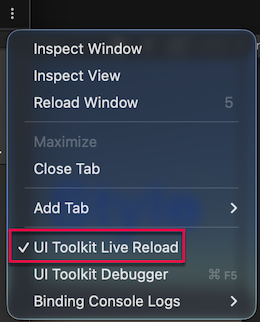
Note: Live reload recreates the entire UI. If you need to preserve state or values, store them so the window restores them after recreation.
Runtime
For the runtime, live reload is enabled by default. You can disable it through the Game view’s More (⋮) menu. It applies to all Game views.
Note: If you add MonoBehaviour components to the same GameObjectThe fundamental object in Unity scenes, which can represent characters, props, scenery, cameras, waypoints, and more. A GameObject’s functionality is defined by the Components attached to it. More info
See in Glossary as the UI Document component, the reload disables them before the reload and re-enables them after. Place UI interaction code in OnEnable and OnDisable on those companions for initialization and teardown.
Additional resources
Copyright © 2023 Unity Technologies
优美缔软件(上海)有限公司 版权所有
"Unity"、Unity 徽标及其他 Unity 商标是 Unity Technologies 或其附属机构在美国及其他地区的商标或注册商标。其他名称或品牌是其各自所有者的商标。
公安部备案号:
31010902002961