public static AnimationCurve CurveField
(string label,
AnimationCurve value,
params GUILayoutOption[] options);
public static AnimationCurve CurveField
(GUIContent label,
AnimationCurve value,
params GUILayoutOption[] options);
public static AnimationCurve CurveField
(AnimationCurve value,
Color color,
Rect ranges,
params GUILayoutOption[] options);
public static AnimationCurve CurveField
(string label,
AnimationCurve value,
Color color,
Rect ranges,
params GUILayoutOption[] options);
public static AnimationCurve CurveField
(GUIContent label,
AnimationCurve value,
Color color,
Rect ranges,
params GUILayoutOption[] options);
パラメーター
| label | フィールドの前に表示するオプションのラベル |
| value | 編集する曲線 |
| color | 曲線を表示する色 |
| ranges | テクスチャを描画するスクリーン上の Rect |
| options | An optional list of layout options that specify extra layouting properties. Any values passed in here will override settings defined by the style.See Also: GUILayout.Width, GUILayout.Height, GUILayout.MinWidth, GUILayout.MaxWidth, GUILayout.MinHeight, GUILayout.MaxHeight, GUILayout.ExpandWidth, GUILayout.ExpandHeight. |
戻り値
AnimationCurve ユーザーが編集する曲線
説明
AnimationCurve を編集するためのフィールドを作成します。
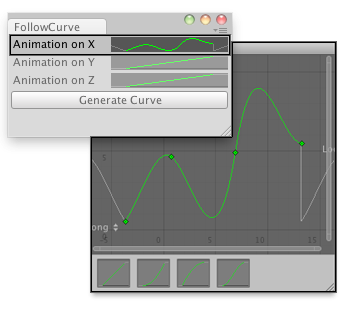
Create an animation on the different axis and assign it to a GameObject.
// Makes the selected GameObject follow the animation curve.
    //
    // Usage: Generate the curves for X,Y and Z axis of your desired GameObject
    // Select an Object and click Generate Curve.
    // Press Play and see your object moving.


    class FollowCurve extends EditorWindow {


        var curveX : AnimationCurve = AnimationCurve.Linear(0,0,10,10);
        var curveY : AnimationCurve = AnimationCurve.Linear(0,0,10,10);
        var curveZ : AnimationCurve = AnimationCurve.Linear(0,0,10,10);


        @MenuItem("Examples/Create Curve For Object")
        static function Init() {
            var window = GetWindow(FollowCurve);
            window.Show();
        }

        function OnGUI() {
            curveX = EditorGUILayout.CurveField("Animation on X", curveX);
            curveY = EditorGUILayout.CurveField("Animation on Y", curveY);
            curveZ = EditorGUILayout.CurveField("Animation on Z", curveZ);

            if(GUILayout.Button("Generate Curve"))
                AddCurveToSelectedGameObject();
        }

        function  AddCurveToSelectedGameObject() {
            if(Selection.activeGameObject) {
                var comp : FollowAnimationCurve =
                    Selection.activeGameObject.AddComponent.<FollowAnimationCurve>();
                comp.SetCurves(curveX, curveY, curveZ);
            } else {
                Debug.LogError("No Game Object selected for adding an animation curve");
            }
        }
    }
例で動作しているスクリプト。
    // This script has to go outside of the Editor Folder.

    var curveX : AnimationCurve;
    var curveY : AnimationCurve;
    var curveZ : AnimationCurve;

    function SetCurves(xC : AnimationCurve, yC : AnimationCurve, zC : AnimationCurve) {
        curveX = xC;
        curveY = yC;
        curveZ = zC;
    }
    function Update() {
        transform.position = Vector3(curveX.Evaluate(Time.time),
                                    curveY.Evaluate(Time.time),
                                    curveZ.Evaluate(Time.time));
    }
パラメーター
| property | 編集する曲線 |
| color | 曲線を表示する色 |
| ranges | テクスチャを描画するスクリーン上の Rect |
| options | An optional list of layout options that specify extra layouting properties. Any values passed in here will override settings defined by the style.See Also: GUILayout.Width, GUILayout.Height, GUILayout.MinWidth, GUILayout.MaxWidth, GUILayout.MinHeight, GUILayout.MaxHeight, GUILayout.ExpandWidth, GUILayout.ExpandHeight. |
説明
AnimationCurve を編集するためのフィールドを作成します。
Copyright © 2023 Unity Technologies
优美缔软件(上海)有限公司 版权所有
"Unity"、Unity 徽标及其他 Unity 商标是 Unity Technologies 或其附属机构在美国及其他地区的商标或注册商标。其他名称或品牌是其各自所有者的商标。
公安部备案号:
31010902002961