public static int LayerField
(int layer,
params GUILayoutOption[] options);
public static int LayerField
(string label,
int layer,
params GUILayoutOption[] options);
public static int LayerField
(string label,
int layer,
GUIStyle style,
params GUILayoutOption[] options);
public static int LayerField
(GUIContent label,
int layer,
GUIStyle style,
params GUILayoutOption[] options);
パラメーター
| label | フィールドのラベル |
| layer | フィールドに表示するレイヤー |
| style | オプションの GUIStyle |
| options | An optional list of layout options that specify extra layouting properties. Any values passed in here will override settings defined by the style.See Also: GUILayout.Width, GUILayout.Height, GUILayout.MinWidth, GUILayout.MaxWidth, GUILayout.MinHeight, GUILayout.MaxHeight, GUILayout.ExpandWidth, GUILayout.ExpandHeight. |
戻り値
int ユーザーによって設定された値
説明
レイヤー選択フィールドを作成します。
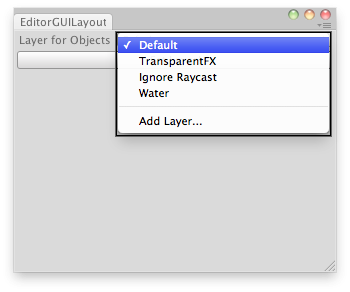
Set the layer of the selected GameObjects.
    // Simple editor script that lets you set the layer for the selected GameObjects.

    class EditorGUILayoutLayerField extends EditorWindow {

        var selectedLayer : int = 0;
        @MenuItem("Examples/Set Layer For Selection")
        static function Init() {
            var window = GetWindow(EditorGUILayoutLayerField);
            window.Show();
        }
        //Disable menu if we dont have at least 1 gameobject selected
        @MenuItem("Examples/Set Layer For Selection", true)
        static function ValidateSelection() {
            return    Selection.activeGameObject != null;
        }

        function OnGUI() {
            selectedLayer = EditorGUILayout.LayerField("Layer for Objects:",selectedLayer);
            if(GUILayout.Button("Set Layer!"))
                SetLayer();
        }
        function SetLayer() {
            for(var go : GameObject in Selection.gameObjects)
                go.layer = selectedLayer;
        }
    }
Copyright © 2023 Unity Technologies
优美缔软件(上海)有限公司 版权所有
"Unity"、Unity 徽标及其他 Unity 商标是 Unity Technologies 或其附属机构在美国及其他地区的商标或注册商标。其他名称或品牌是其各自所有者的商标。
公安部备案号:
31010902002961