Visual Effect Graph 首选项
Visual Effect Graph preferences 是 Unity Preferences 窗口中的一个面板。要访问此面板,请转到 Edit > Preferences > Visual Effects。
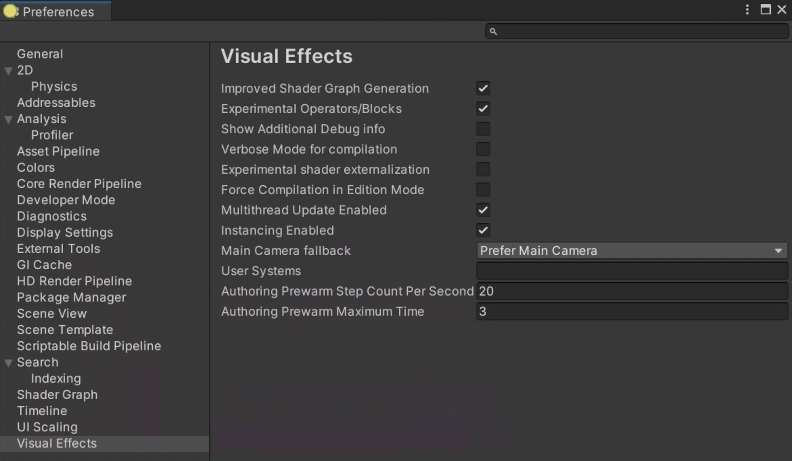
属性
| 名称 | 描述 |
|---|---|
| Experimental Operators/Blocks | 在 Node Creation 菜单 |
| Show Additional Debug info | 选择 Blocks, Operators 或 Contexts |
| Verbose Mode for Compilation | 当 Unity 编译 VFX 图形时,在控制台中启用详细日志记录。 |
| Experimental Shader Externalization | 在 Visual Effect Graph Asset Inspector中启用外部化着色器以进行调试目的。 |
| Generate Shaders with Debug Symbols | 当Unity编译VFX图时,启用着色器调试符号。 |
| Force Compilation in Edition Mode | 在保存资产时禁用图形优化(仅出于调试目的) |
| Main Camera fallback | 指定MainCamera运算符的相机源,并在编辑器中使用Blocks。选项是: • Prefer Main Camera: 如果 Game 视图处于打开状态,Unity 将使用主摄像头。如果 Game 视图未打开,但 Scene 视图打开,则 Unity 将使用 Scene 视图摄像机。 • Prefer Scene Camera: 如果 Scene 视图处于打开状态,则 Unity 将使用 Scene 视图摄像机。如果 Scene 视图未打开,但 Game 视图打开,则 Unity 使用主摄像机。 • No Fallback: 使用主摄像机,即使 Unity 未向主摄像机渲染。 |
| User Systems | 指定存储 VFX Graph 资产的目录的路径,以用作新效果的模板。此文件夹中的任何 VFX Graph 资源都会显示在 System 下的 Visual Effect Graph 视图上下文菜单中。 |
| Authoring Prewarm Step Count Per Second | 指定每秒的步数自动重新初始化 预热。在创作 VFX 图表时,较高的值可能会影响性能。 |
| Authoring Prewarm Maximum Time | 指定自动重新初始化 可以预热。 |