在 URP 中编写无光照基本着色器
以下示例显示了一个兼容 URP 的基本着色器。此着色器使用着色器代码中预定义的颜色来填充网格形状。
要亲自试用此着色器,请将以下__ ShaderLab__Unity 用于定义着色器对象结构的语言。更多信息
See in Glossary 代码复制并粘贴到着色器资源中。
// This shader fills the mesh shape with a color predefined in the code.
Shader "Example/URPUnlitShaderBasic"
{
    // The properties block of the Unity shader. In this example this block is empty
    // because the output color is predefined in the fragment shader code.
    Properties
    { }

    // The SubShader block containing the Shader code.
    SubShader
    {
        // SubShader Tags define when and under which conditions a SubShader block or
        // a pass is executed.
        Tags { "RenderType" = "Opaque" "RenderPipeline" = "UniversalPipeline" }

        Pass
        {
            // The HLSL code block. Unity SRP uses the HLSL language.
            HLSLPROGRAM
            // This line defines the name of the vertex shader.
            #pragma vertex vert
            // This line defines the name of the fragment shader.
            #pragma fragment frag

            // The Core.hlsl file contains definitions of frequently used HLSL
            // macros and functions, and also contains #include references to other
            // HLSL files (for example, Common.hlsl, SpaceTransforms.hlsl, etc.).
            #include "Packages/com.unity.render-pipelines.universal/ShaderLibrary/Core.hlsl"

            // The structure definition defines which variables it contains.
            // This example uses the Attributes structure as an input structure in
            // the vertex shader.
            struct Attributes
            {
                // The positionOS variable contains the vertex positions in object
                // space.
                float4 positionOS   : POSITION;
            };

            struct Varyings
            {
                // The positions in this struct must have the SV_POSITION semantic.
                float4 positionHCS  : SV_POSITION;
            };

            // The vertex shader definition with properties defined in the Varyings
            // structure. The type of the vert function must match the type (struct)
            // that it returns.
            Varyings vert(Attributes IN)
            {
                // Declaring the output object (OUT) with the Varyings struct.
                Varyings OUT;
                // The TransformObjectToHClip function transforms vertex positions
                // from object space to homogenous clip space.
                OUT.positionHCS = TransformObjectToHClip(IN.positionOS.xyz);
                // Returning the output.
                return OUT;
            }

            // The fragment shader definition.
            half4 frag() : SV_Target
            {
                // Defining the color variable and returning it.
                half4 customColor = half4(0.5, 0, 0, 1);
                return customColor;
            }
            ENDHLSL
        }
    }
}
片元着色器将游戏对象着色为深红色(RGB 值 (0.5, 0, 0))。
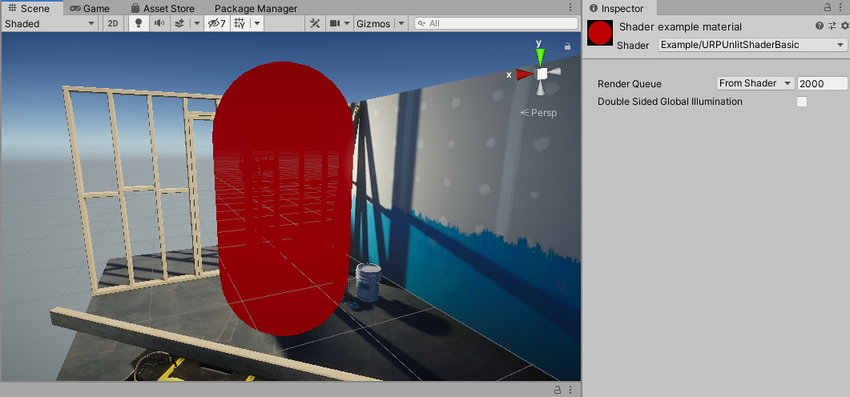
下面的一节将介绍这个基本 Unity 着色器的结构。
基本 ShaderLab 结构
Unity 着色器使用称为 ShaderLab 的 Unity 特定语言编写。
此示例中的 Unity 着色器具有以下代码块:
Shader 代码块
ShaderLab 代码以 Shader 声明开头。
Shader "Example/URPUnlitShaderBasic"
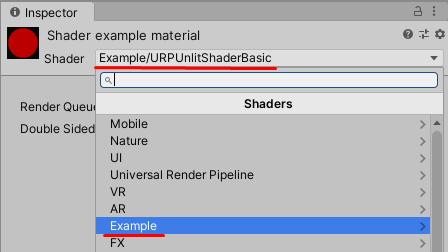
此声明中的路径决定了 Unity 着色器在材质着色器 (Shader) 菜单中的显示名称和位置。Shader.Find 方法也使用此路径。
Properties 代码块
Properties 代码块包含了用户可以在材质的检视面板 (Inspector) 窗口中设置的属性声明。
在此示例中,Properties 代码块为空,因为该 Unity 着色器不提供用户可定义的任何材质属性。
SubShader 代码块
Unity 着色器源文件包含一个或多个 SubShader 代码块。渲染网格时,Unity 会选择与目标设备上的 GPU 兼容的第一个子着色器。
SubShader 代码块可以选择性包含 SubShader Tags 代码块。应使用 Tags 关键字来声明 SubShader Tags 代码块。
Tags { "RenderType" = "Opaque" "RenderPipeline" = "UniversalPipeline" }
一个名为 RenderPipeline 的子着色器标签告知 Unity 将此子着色器用于哪些渲染管线,而 UniversalPipeline 的值指示 Unity 应将此子着色器用于 URP。
要在不同的渲染管线中执行同一个着色器,请创建多个具有不同 RenderPipeline 标签值的 SubShader 代码块。要在 HDRP 中执行 SubShader 代码块,请将 RenderPipeline 标签设置为 HDRenderPipeline,要在内置渲染管线中执行该代码块,请将 RenderPipeline 设置为空值。
有关子着色器标签的更多信息,请参阅 ShaderLab:子着色器标签。
Pass 代码块
在此示例中,有一个包含 HLSL 程序代码的 Pass 代码块。有关 Pass 代码块的更多信息,请参阅 ShaderLab:通道。
Pass 代码块可以选择性包含 Pass 标签代码块。有关更多信息,请参阅 URP ShaderLab Pass 标签。
HLSLPROGRAM 代码块
此代码块包含 HLSL 程序代码。
注意:HLSL 语言是 URP 着色器的首选语言。
注意:URP 支持 CG 语言。如果在着色器中添加 CGPROGRAM/ENDCGPROGRAM 代码块,Unity 会自动包含来自内置渲染管线库的着色器。如果您添加来自 SRP 着色器库的着色器,某些 SRP 着色器宏和函数可能会与内置渲染管线着色器函数发生冲突。包含 CGPROGRAM 代码块的着色器与 SRP 批处理程序 (SRP Batcher) 不兼容。
此代码块包含引用 Core.hlsl 文件的 #include 声明。
#include "Packages/com.unity.render-pipelines.universal/ShaderLibrary/Core.hlsl"
Core.hlsl 文件包含常用 HLSL 宏和函数的定义,还包含对其他 HLSL 文件(例如,Common.hlsl 和 SpaceTransforms.hlsl)的 #include 引用。
例如,HLSL 代码中的顶点着色器使用 SpaceTransforms.hlsl 文件中的 TransformObjectToHClip 函数。该函数将顶点位置从对象空间变换到齐次空间:
Varyings vert(Attributes IN)
{
    Varyings OUT;
    OUT.positionHCS = TransformObjectToHClip(IN.positionOS.xyz);
    return OUT;
}
以下这段基本 HLSL 代码中的片元着色器会输出代码中预定义的单一颜色:
half4 frag() : SV_Target
{
    half4 customColor;
    customColor = half4(0.5, 0, 0, 1);
    return customColor;
}
带有颜色输入的 URP 无光照着色器一节介绍了如何在材质检视面板窗口中添加可编辑的颜色属性。
Copyright © 2023 Unity Technologies
优美缔软件(上海)有限公司 版权所有
"Unity"、Unity 徽标及其他 Unity 商标是 Unity Technologies 或其附属机构在美国及其他地区的商标或注册商标。其他名称或品牌是其各自所有者的商标。
公安部备案号:
31010902002961