在 URP 中的着色器中重建世界空间位置
此示例中的 Unity 着色器使用深度纹理和屏幕空间 UV 坐标来重建像素的世界空间位置。该着色器在网格上绘制棋盘图案,使位置可视化。
下图展示了最终结果:

本页包含以下部分:
创建示例场景
按照本节中的步骤创建示例场景:
将 URP 安装到现有 Unity 项目中,或使用通用项目模板创建新项目。
-
在示例场景 (Scene) 中,创建一个平面游戏对象,并将其放置在适当位置以使其遮挡一些游戏对象。
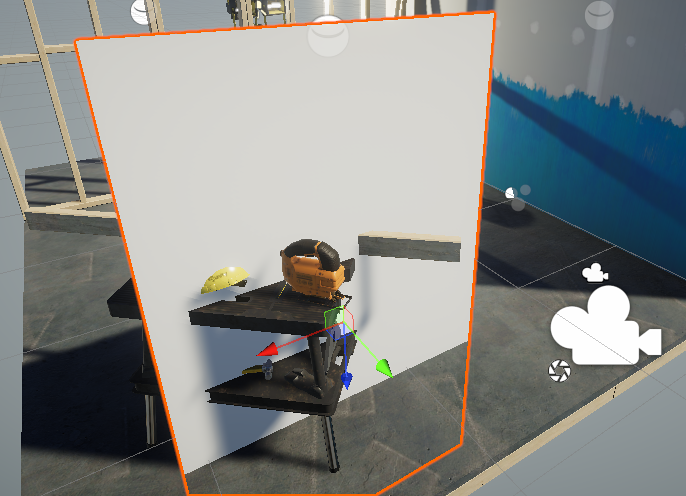
创建平面 创建一个新材质并将其分配给平面。
创建一个新着色器并将其分配给材质。从 URP 无光照基本着色器页面复制并粘贴 Unity 着色器源代码。
选择 URP 资源。
-
在 URP 资源的常规 (General) 部分中,启用
Depth Texture。
在 URP 资源中,启用深度纹理 (Depth Texture) 打开在第 4 步中创建的着色器。
编辑 ShaderLab 代码
本节假设已从 URP 无光照基本着色器页面复制了相应的源代码。
对__ ShaderLab__Unity 用于定义着色器对象结构的语言。更多信息
See in Glossary 代码进行以下更改:
-
在
HLSLPROGRAM代码块中,为深度纹理着色器头文件添加 include 声明。例如,将其放在Core.hlsl现有的 include 声明下方。#include "Packages/com.unity.render-pipelines.universal/ShaderLibrary/Core.hlsl" // The DeclareDepthTexture.hlsl file contains utilities for sampling the Camera // depth texture. #include "Packages/com.unity.render-pipelines.universal/ShaderLibrary/DeclareDepthTexture.hlsl"DeclareDepthTexture.hlsl文件包含用于对摄像机深度纹理进行采样的函数。此示例使用SampleSceneDepth函数对像素的 Z 坐标进行采样。 -
在片元着色器定义中,添加
Varyings IN作为输入。half4 frag(Varyings IN) : SV_Target在此示例中,片元着色器使用
Varyings结构中的positionHCS属性来获取像素的位置。 -
在片元着色器中,要计算深度缓冲区采样的 UV 坐标,请将像素位置除以渲染目标分辨率
_ScaledScreenParams。属性_ScaledScreenParams.xy会考虑渲染目标的任何缩放,例如动态分辨率。float2 UV = IN.positionHCS.xy / _ScaledScreenParams.xy; -
在片元着色器中,使用
SampleSceneDepth函数对深度缓冲区进行采样。#if UNITY_REVERSED_Z real depth = SampleSceneDepth(UV); #else // Adjust z to match NDC for OpenGL real depth = lerp(UNITY_NEAR_CLIP_VALUE, 1, SampleSceneDepth(UV)); #endif
SampleSceneDepth 函数来自 DeclareDepthTexture.hlsl 文件。它返回 [0, 1] 范围内的 Z 值。
要使重建函数 (ComputeWorldSpacePosition) 正常工作,深度值必须位于归一化设备坐标 (NDC) 空间中。在 D3D 中,Z 处于 [0,1] 范围内,而在 OpenGL 中,Z 处于 [-1, 1] 范围内。
此示例使用 UNITY_REVERSED_Z 常量来确定平台并调整 Z 值范围。有关更多说明,请查看此示例中的第 6 步。
UNITY_NEAR_CLIP_VALUE 变量是裁剪空间的与平台无关的近裁剪面值。
有关更多信息,请参阅平台特定的渲染差异。
-
从像素的 UV 和 Z 坐标重建世界空间位置。
float3 worldPos = ComputeWorldSpacePosition(UV, depth, UNITY_MATRIX_I_VP);ComputeWorldSpacePosition是一个实用函数,根据 UV 和深度 (Z) 值计算世界空间位置。此函数在 SRP Core 包的Common.hlsl文件中定义。UNITY_MATRIX_I_VP是一个逆视图投影矩阵,可将点从裁剪空间变换为世界空间。 -
要使像素的世界空间位置可视化,请创建棋盘效果。
uint scale = 10; uint3 worldIntPos = uint3(abs(worldPos.xyz * scale)); bool white = (worldIntPos.x & 1) ^ (worldIntPos.y & 1) ^ (worldIntPos.z & 1); half4 color = white ? half4(1,1,1,1) : half4(0,0,0,1);scale是棋盘图案大小的逆缩放。abs函数将图案镜像到负坐标侧。worldIntPos变量的uint3声明将坐标位置取为整数。表达式
<integer value> & 1中的AND运算符检查该值是偶数 (0) 还是奇数 (1)。该表达式让代码将表面划分为正方形。表达式
<integer value> ^ <integer value>中的XOR运算符会翻转正方形颜色。对于未渲染几何图形的区域,深度缓冲区可能没有任何有效值。以下代码会在这些区域绘制黑色。
#if UNITY_REVERSED_Z
    if(depth < 0.0001)
        return half4(0,0,0,1);
#else
    if(depth > 0.9999)
        return half4(0,0,0,1);
#endif
不同的平台对远裁剪面使用不同的 Z 值(0 == far,或 1 == far)。
UNITY_REVERSED_Z常量让代码可以正确处理所有平台。保存着色器代码,示例即准备就绪。
下图展示了最终结果:
完整的 ShaderLab 代码
以下是此示例的完整 ShaderLab 代码。
// This Unity shader reconstructs the world space positions for pixels using a depth
// texture and screen space UV coordinates. The shader draws a checkerboard pattern
// on a mesh to visualize the positions.
Shader "Example/URPReconstructWorldPos"
{
    Properties
    { }

    // The SubShader block containing the Shader code.
    SubShader
    {
        // SubShader Tags define when and under which conditions a SubShader block or
        // a pass is executed.
        Tags { "RenderType" = "Opaque" "RenderPipeline" = "UniversalPipeline" }

        Pass
        {
            HLSLPROGRAM
            // This line defines the name of the vertex shader.
            #pragma vertex vert
            // This line defines the name of the fragment shader.
            #pragma fragment frag

            // The Core.hlsl file contains definitions of frequently used HLSL
            // macros and functions, and also contains #include references to other
            // HLSL files (for example, Common.hlsl, SpaceTransforms.hlsl, etc.).
            #include "Packages/com.unity.render-pipelines.universal/ShaderLibrary/Core.hlsl"

            // The DeclareDepthTexture.hlsl file contains utilities for sampling the
            // Camera depth texture.
            #include "Packages/com.unity.render-pipelines.universal/ShaderLibrary/DeclareDepthTexture.hlsl"

            // This example uses the Attributes structure as an input structure in
            // the vertex shader.
            struct Attributes
            {
                // The positionOS variable contains the vertex positions in object
                // space.
                float4 positionOS   : POSITION;
            };

            struct Varyings
            {
                // The positions in this struct must have the SV_POSITION semantic.
                float4 positionHCS  : SV_POSITION;
            };

            // The vertex shader definition with properties defined in the Varyings
            // structure. The type of the vert function must match the type (struct)
            // that it returns.
            Varyings vert(Attributes IN)
            {
                // Declaring the output object (OUT) with the Varyings struct.
                Varyings OUT;
                // The TransformObjectToHClip function transforms vertex positions
                // from object space to homogenous clip space.
                OUT.positionHCS = TransformObjectToHClip(IN.positionOS.xyz);
                // Returning the output.
                return OUT;
            }

            // The fragment shader definition.
            // The Varyings input structure contains interpolated values from the
            // vertex shader. The fragment shader uses the `positionHCS` property
            // from the `Varyings` struct to get locations of pixels.
            half4 frag(Varyings IN) : SV_Target
            {
                // To calculate the UV coordinates for sampling the depth buffer,
                // divide the pixel location by the render target resolution
                // _ScaledScreenParams.
                float2 UV = IN.positionHCS.xy / _ScaledScreenParams.xy;

                // Sample the depth from the Camera depth texture.
                #if UNITY_REVERSED_Z
                    real depth = SampleSceneDepth(UV);
                #else
                    // Adjust Z to match NDC for OpenGL ([-1, 1])
                    real depth = lerp(UNITY_NEAR_CLIP_VALUE, 1, SampleSceneDepth(UV));
                #endif

                // Reconstruct the world space positions.
                float3 worldPos = ComputeWorldSpacePosition(UV, depth, UNITY_MATRIX_I_VP);

                // The following part creates the checkerboard effect.
                // Scale is the inverse size of the squares.
                uint scale = 10;
                // Scale, mirror and snap the coordinates.
                uint3 worldIntPos = uint3(abs(worldPos.xyz * scale));
                // Divide the surface into squares. Calculate the color ID value.
                bool white = ((worldIntPos.x) & 1) ^ (worldIntPos.y & 1) ^ (worldIntPos.z & 1);
                // Color the square based on the ID value (black or white).
                half4 color = white ? half4(1,1,1,1) : half4(0,0,0,1);

                // Set the color to black in the proximity to the far clipping
                // plane.
                #if UNITY_REVERSED_Z
                    // Case for platforms with REVERSED_Z, such as D3D.
                    if(depth < 0.0001)
                        return half4(0,0,0,1);
                #else
                    // Case for platforms without REVERSED_Z, such as OpenGL.
                    if(depth > 0.9999)
                        return half4(0,0,0,1);
                #endif

                return color;
            }
            ENDHLSL
        }
    }
}
Copyright © 2023 Unity Technologies
优美缔软件(上海)有限公司 版权所有
"Unity"、Unity 徽标及其他 Unity 商标是 Unity Technologies 或其附属机构在美国及其他地区的商标或注册商标。其他名称或品牌是其各自所有者的商标。
公安部备案号:
31010902002961